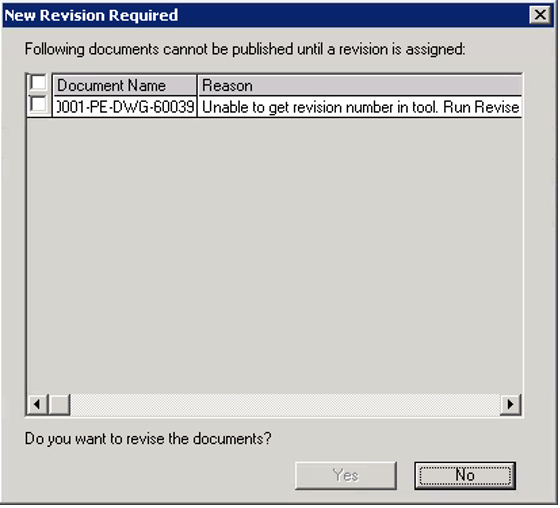
The SmartPlant P&ID Drawing Manager verifies if a drawing has already been published in SPF. New drawings must obtain a revision in SPF. This is a one-time process for drawings being published for the first time.
1. Select the checkbox next to the drawing number and click Yes.
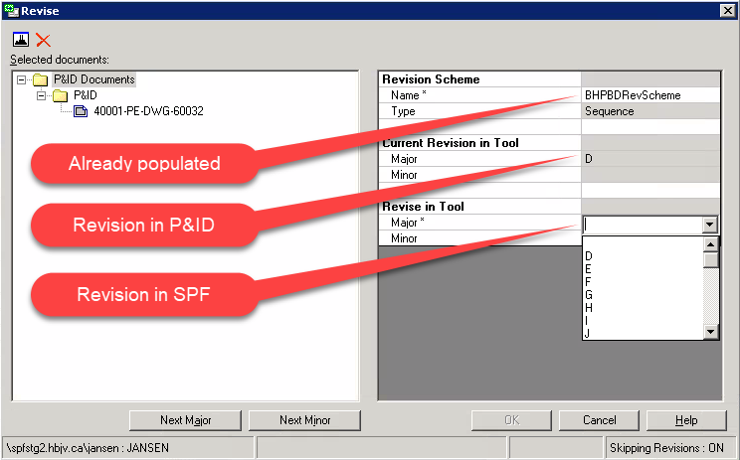
Result: The Revise window opens.
2. You will then be asked to provide the following:
The revision scheme to use in SPF: This is already populated and cannot be changed.
The revision to use in SPF: In the Revise in Tool section, under Major*,select the same revision as the one displayed under Current Revision in Tool. The revisions in Smart P&ID and SPF must match.
3. Click OK.
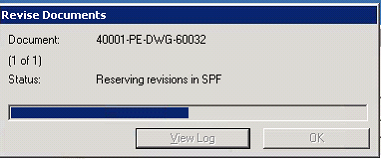
Result: A pop-up window with a progress bar appears while the revision is being reserved in SPF. Upon completion, a confirmation message appears.
4. Click OK.
After the revisioning is complete, the publishing process begins. Revisioning in SPF is done only once.