Tag Systemization Tab
User requires to add/import data into the Tag Systemization table prior to validating existing Redlines, TQ, and NCR data.
Topics Covered in this section
-Importing/Adding Data
-Tag Systemization - Menu
-Tag Systemization - Table Overview
-Tag Systemization - General Workflow
Importing/Adding Data
Users can either manually input, copy/paste an existing list, or import a .CSV with a list of tags and related subsystem within the Tag Systemization tab.
The .CSV file requires 2 columns, with headers as shown below.
|
Tag Number
|
Subsystem
|
|
Tag Number #1
|
Subsystem
|
|
Tag Number #2
|
Subsystem
|
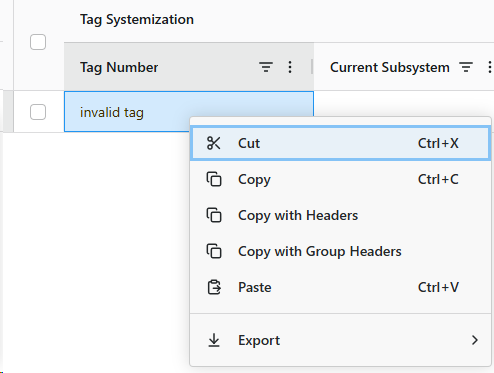
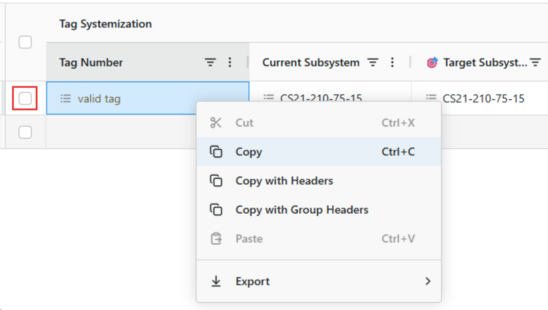
NOTE: If user manually input a line item incorrectly, text will remain but no additional data will be loaded. This text can be removed, but a successful Tag Number with loaded data can no longer be deleted. Disable actions for the line item by keeping it unchecked.
Tag Systemization - Menu

|
Import CSV
|
Open windows dialog box to navigate and import a 2 column .CSV
|
|
Run Validations
|
Validates and produces a Proposed Actions based on Current Subsystem and Target Subsystem columns
|
|
Save Changes to SPF
|
Save any changes to SPF of line items currently selected
|
|
Export to CSV
|
Exports .CSV list containing Tag Number and Target Subsystem columns of all line items
|
|
Export to Excel
|
Exports .XLSX list of all line items
|
|
Clear Filter
|
Clear all filters currently active to columns
|
Tag Systemization – Table Overview

The systemization table consists of 4 sections:
1. Tag Systemization
-
Tag Number – Imported/inputted CDW tag. Tags action menu available from here;
-
Current Subsystem – Subsystem the tag is associated to. Subsystems action menu available here;
-
Target Subsystem – Target subsystem the tag will be associated with. Subsystems action menu available here;
-
Proposed Action – Proposed action based on subsystem comparison.
2. Current Subsystem
-
Status – Status of current subsystem;
-
Approved ToD? – Is the subsystem approved for Turnover Dossier;
-
Approved HoD? – Is the subsystem approved for Handover Dossier;
-
FHN – Which FHN the subsystem is associated with.
3. Target Subsystem
-
Status – Status of current subsystem;
-
Approved ToD? – Is the subsystem approved for Turnover Dossier;
-
Approved HoD? – Is the subsystem approved for Handover Dossier;
-
FHN – Which FHN the subsystem is associated with.
4. Tag Details
-
MTR Flag – Is tag within Master Tag Register;
-
Approved ToD? – Is the tag approved for Turnover Dossier;
-
Approved HoD? – Is the tag approved for Handover Dossier;
-
Is Locked? – Is the tag locked for handover;
-
Tag Description – Description of tag;
-
CDW Count – Duplicates of tag within CDW with the same class;
-
SPF Class – Defines the tags class to differentiate between duplicate tags;
-
UID – Unique identifier for the tag;
-
OBID – Object ID of tag within SPF.
Tag Systemization – General Workflow
1. Import/manually add CDW tags to the tag systemization table, all valid data will be populated;
2. Review current and target subsystem, add/update/remove when required;
3. Run Validations to update the proposed action column for all tags;
4. Review proposed action, update target subsystem if required. Re-run validation to confirm appropriate proposed action;
6. Select/deselect a line items check box if Save changes to SPF is applicable;
7. Save changes to SPF to submit changes.