Check Published Documents in SPF
Once the drawing has been published, it is added to a processing queue in SPF where drawings and other published documents are handled in the order in which they arrive.
To view the content of a queue log into SPF and click on the Published Documents In Queue icon in the toolbar.
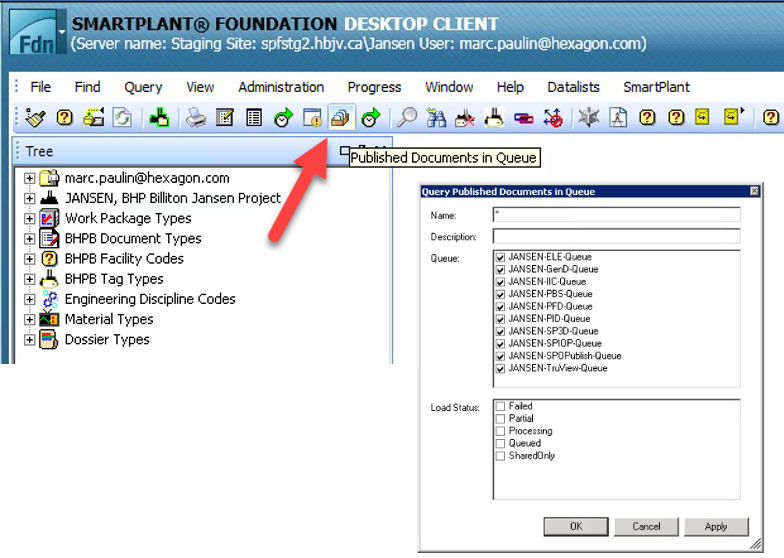
Result: This Query Published Documents in Queue window opens, displaying the queues in SPF for various tools or processes. The JANSEN-PID-Queue is for published P&ID drawings. You can select the queue to view the status of all P&ID drawings. To find a specific P&ID drawing, type its name in the Name field and click OK.
Note: if you are monitoring the queue as the drawing is being published, you will see the drawing appearing in the queue briefly for processing and then being removed. An empty window means that all documents and drawings have been published successfully and thus removed from the queue. Any drawings that failed to publish will stay listed in the window.
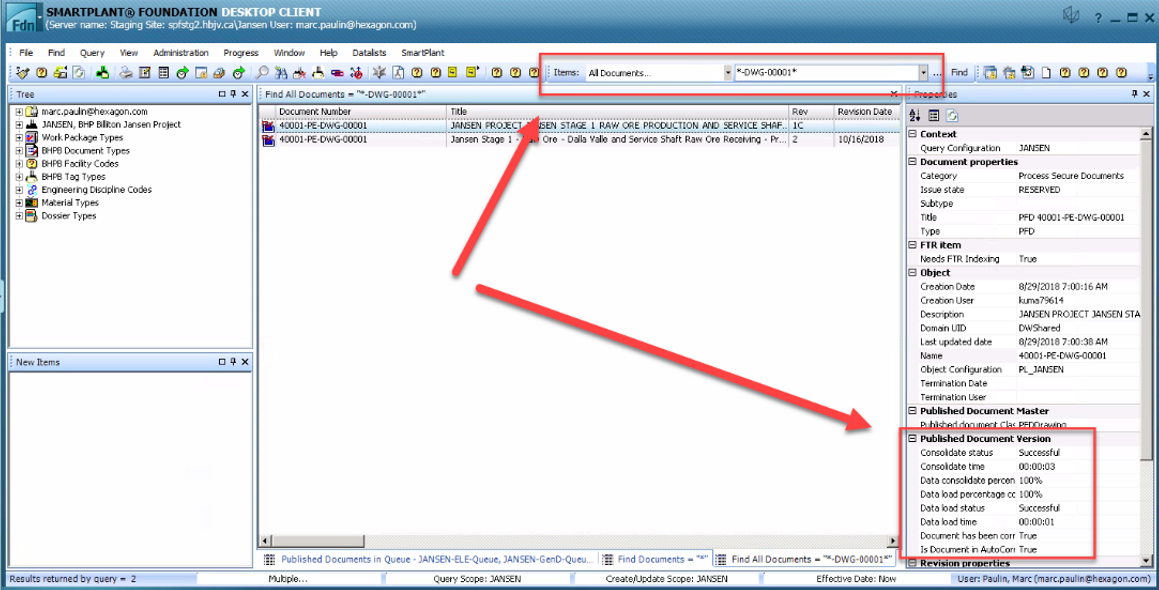
To see the processing status of the P&ID drawing after it is removed from the queue, search for the drawing in the All Documents... QuickFind search bar in SPF. Enter the drawing number, click to select the result and then look at the Published Document Version properties.