"Publish" Function
“What is happening when I publish?”, “Why are ‘documents’ so relevant to the process?”, “What is the difference between a revision and a version of a document?”, “Why is the mechanism not instantaneous?”, “What do I need to do before I publish?”… are some of the questions raised by HBJV engineering team members. To answer them, here we describe some of the mechanics of Publish and Retrieve (P&R).
Publish and Retrieve is not simply an extract-transform-load (ETL) operation (as used in E&I). This operation is "extract, transform, validate, compare, transport, transform, validate and selectively load" (ETVCTTVSLC), where:
-
"Publish" means extracting data from the source application. This extract of data is scoped by a document container, for example, a P&ID or a cable schedule. This means that not all the data from a source application is published to SPF, and not in a single operation.
-
"Transform" means transforming the data from the data model of the source application to the data model of SPF
-
"Validate" means ensuring the data conforms to the target (in this case SPF) data model.
-
"Compare" means providing segregation from other disciplines data to allow for comparison and consistency checking
-
"Retrieve" or "Transport" means sending the packets of data including additions and deletions to the target application
-
"Transform" means transforming the data from the data model of SPF in the middle to the target applications data model.
-
"Validate" means ensuring the data conforms to the target (in this case the application) data model.
-
"Selectively load" means allowing the user to select the data e.g. via "pick and place" or via a "to-do list".
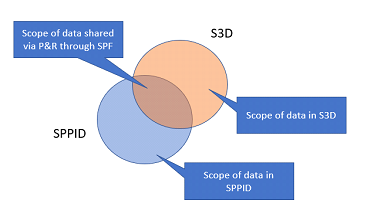
Only data associated with the selected deliverable(s) is published. For example, when the user selects one or more P&IDs to publish, the publish adaptor for the tool creates the following:
-
A rendered view of the P&ID document, which is used for viewing, markup and navigation between documents (e.g. P&ID to 3D) in SPF and it is attached to the appropriate document object in SPF.
-
A packet of XML that contains the data in the selected P&ID, for example, equipment tags, pipelines, or instruments.
-
A packet of XML, referred to as "tombstones" that contains the data for the selected P&ID that has been deleted or modified since the last publishing operation. This is one of the most important packets of information for downstream applications – “tell me what tags have been deleted so that I can have the system remove them (under my control) from my application too”. Clearly the "under my control" via a to-do list is important, as we cannot simply assume that a deletion is correct, it might have been a mistake in the source application.
What happens to the documents and data packets created by the publishing operation?
The packets of data are transported to SPF, and the rendered view of each published P&ID is attached as a file (within the SPF vault) to its appropriate document object in SPF.
Each time a document is republished, a new version of the document is created in SPF as shown in the following figure. There can be multiple versions of a document, one created for each publishing operation of the document.
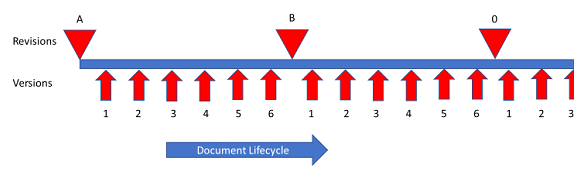
Figure 1: Document Lifecycle
Important: The Publish function is not the same as Issue or Release.
The published versions, or revisions can be retrieved by other disciplines throughout the engineering cycle. The combination of the document revision, the document status and the revision status signify the issue or release status of the document, as shown in the following figure. The most important document information is the Revision Status, where "Current" means the document is locked and cannot be updated. If the document is required to be updated, a new revision must be created. For more details on this process, please refer to the online help https://spf.hbjv.ca/JansenWeb/help/#/browse/873552?_k=0pa8ku

What happens to the data created by the publish operation?
Each of the SmartPlant tools is considered an authoring domain, managing the creation and evolution of task-specific engineering data. Each authoring tool has a corresponding publishing domain in SPF as shown in the following figure. SP&ID always publishes to the SP&ID publishing domain in SPF, S3D always publishes to the S3D-publishing domain in SPF, etc. There can also be authoring domains in SPF. An example of such an authoring domain is CTA (central tag allocation), which also has a corresponding publishing domain.
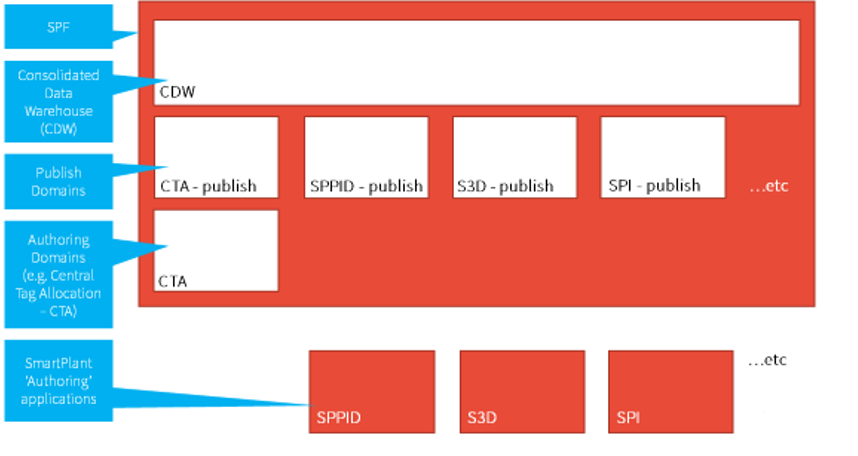
During the publishing cycle, the abovementioned two packets of XML data are unpacked, the data is transformed to the SPF data model via mapping, validated against the data model and loaded into the appropriate tool's corresponding publishing domain.
The next step is to correlate the data, which means to ensure that, for example, a tag published from SP&ID is the same tag that's published by S3D. This is done via the Correlate function configured in the Jansen publishing workflow.
After the data is correlated, the following step is to compare it to determine if it is consistent.
Note: Only correlated data can be compared.
When the data is published to SPF using this workflow, the mapped data between the tool's publish domain and the CDW domain, is "rolled up" to the CDW, which means that a relationship is established (correlation) between tags in other publishing domains, as shown in the following figure.
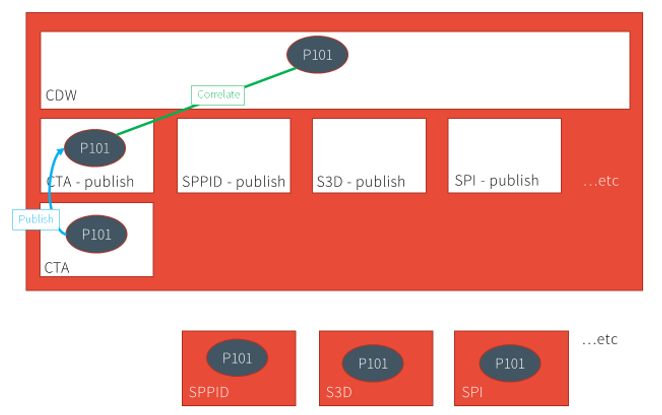
The following figure shows an example of a tag (P101) published by CTA, which is rolled up to the CDW via the Auto-Correlate function.
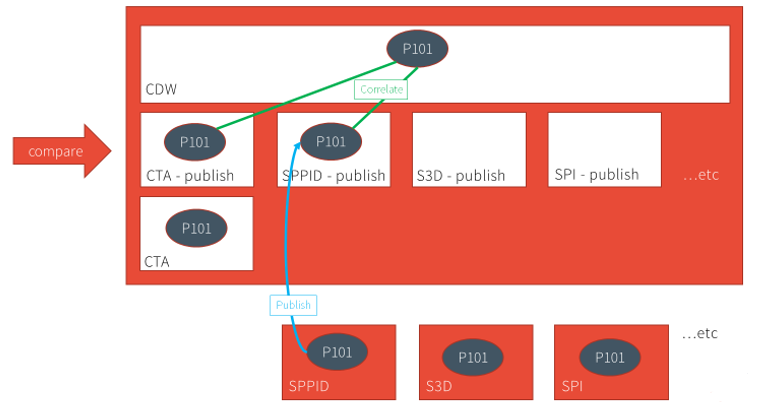
When P&ID publishes a piping and instrumentation diagram that contains the same tag, it creates the tag in the publishing domain, and using the Auto-Correlate function, rolls it up to CDW while establishing relationships (shown as green lines in the following figure) with the same tag in the other publishing domains. These relationships enable the consistency-checking capability in SPF, comparing the tag data between multiple domains; in this example, between CTA and SP&ID.
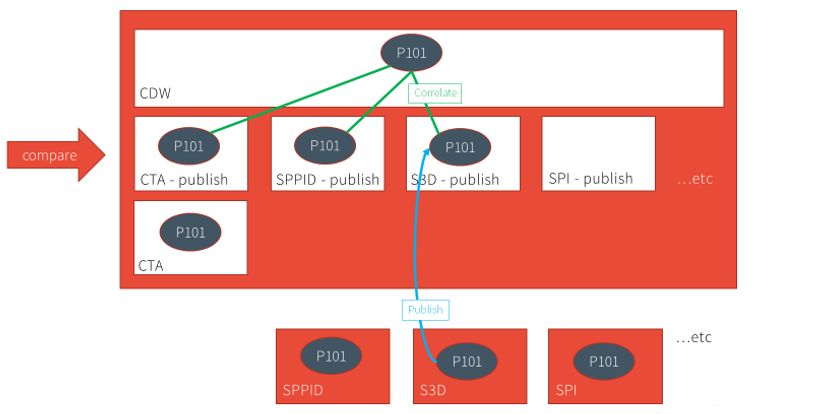
After S3D publishes and autocorrelates the same tag, the comparison is extended to include this data, as well as data from other tools.
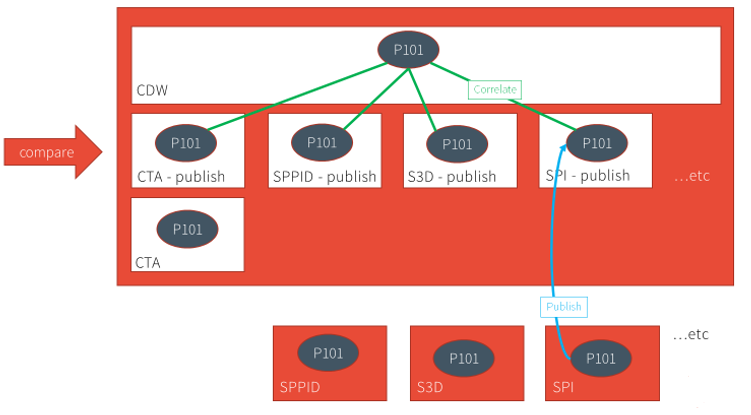
The process described in the above paragraphs is referred to as "publish and compare". When the data is published from the tools, loaded into the respective publish domains, and rolled-up/correlated in CDW, that enables comparison of the published "snapshot" data across the publishing domains.
Who should execute the Publish operation?
While procedure 40001-EM-SOP-60087 - Data Centric Deliverable Production indicates that designers execute the publish function, it is recommended that at this time the discipline champions within the functions are the ones to execute these functions on behalf of their disciplines.
